
Why Busy Studios Rely on a Fitness Software Help Desk to Scale Support

How a Fitness Software Help Desk Helps Busy Studios Scale
A fitness software help desk helps staff resolve member and system problems without losing track of requests. When comparing support options, look for clear contact channels, stated response times, self-service guides, and a path for urgent access or payment issues. A desk that understands gym operations can help staff sort a failed check-in from an app login problem and get each issue to the right person.
That matters when the front desk is busy: one unresolved access issue can take time away from check-ins, classes, and members who need help.
I’m Eric A. Speer, owner and CEO of Club Systems. My work across gym software, daily operations, and member management has shown me why a reliable fitness software help desk matters as a studio grows.
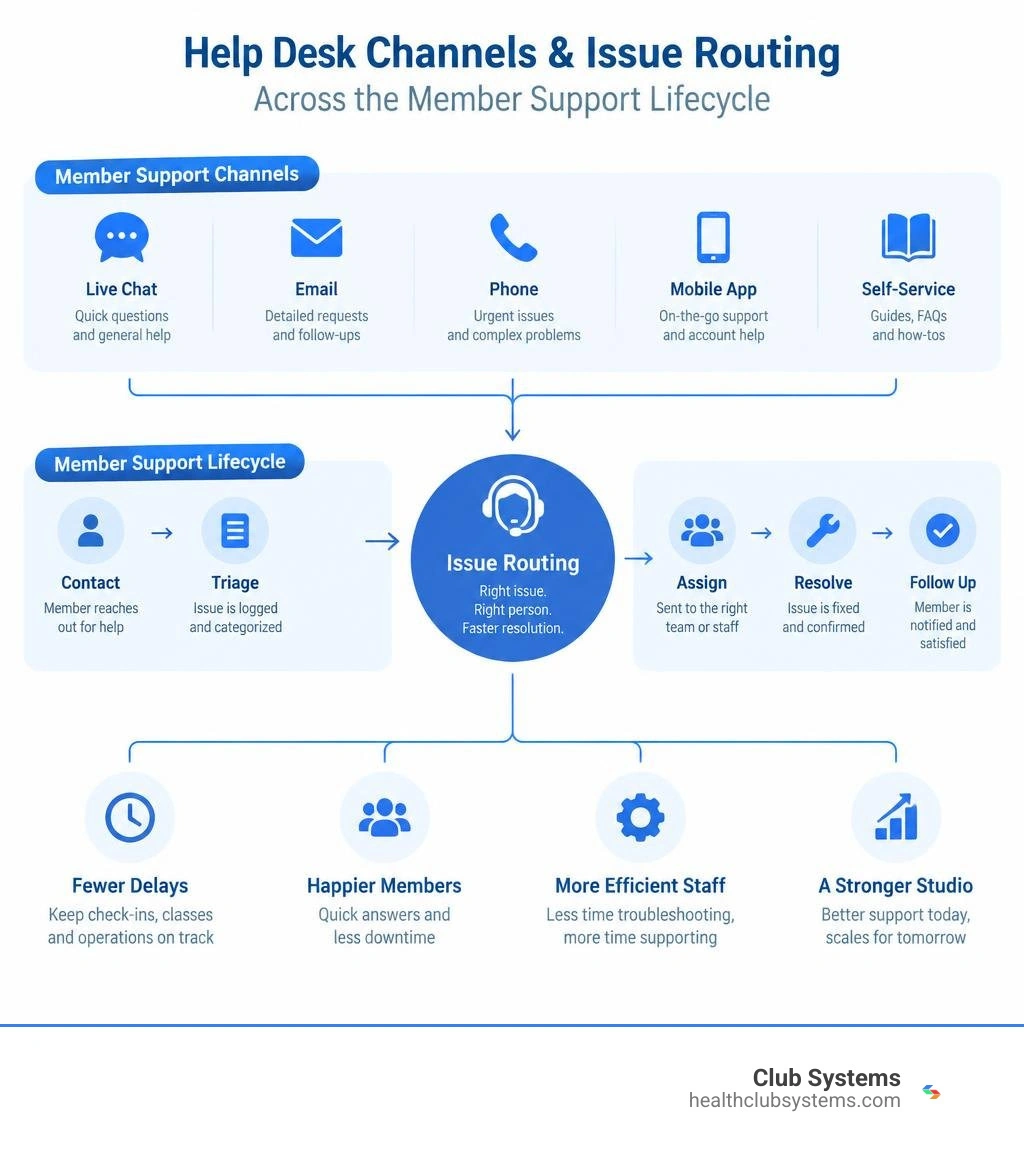
Core Features of an Effective Fitness Software Help Desk
Managing support in a modern health club means fielding queries across dozens of operational touchpoints. An issue can be as simple as a member asking how to change their billing card or as complex as an automated turnstile locking out early-morning gym-goers.
An effective help desk acts as the central brain for these interactions. When your operational backbone connects directly to real-time troubleshooting, your team spends less time playing detective and more time coaching and engaging members. We have long seen why exceptional tech support matters when choosing a gym software partner, because software is only as good as the reliability backing it up.
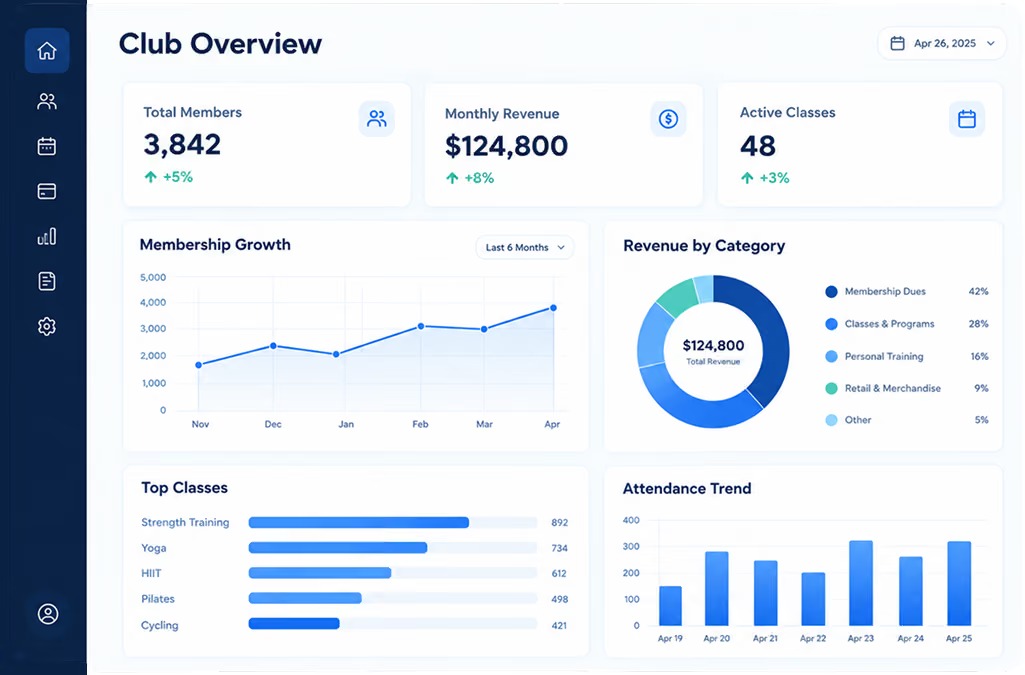
A well-structured platform combines automated ticketing, multi-channel intake, and comprehensive self-service options. For instance, public support portals like the Fernwood Fitness Helpdesk show how standardized hubs help users resolve everyday account questions independently. When comparing fitness help desk systems, look for these foundational components:
- Centralized Ticket Intake: Consolidates web forms, direct emails, and mobile tickets into a unified administrative queue.
- Smart Issue Categorization: Automatically routes technical hardware glitches, billing updates, and workout inquiries to designated staff members.
- Built-in Knowledge Hubs: Houses operational guides and video tutorials for members and staff alike.
- Escalation Paths: Guarantees that critical operational failures—such as gate controller drops—reach technical specialists without delay.
Operational models that structure distinct categories for access, software, and specialized training equipment create clear accountability.
In-App vs. Web Portal: How a Fitness Software Help Desk Channels Member Inquiries
How members reach you dictates how fast their problems get resolved. Different inquiry methods serve distinct operational needs:
- In-App Support Tickets: Members report issues directly inside the branded mobile interface by navigating to Settings, tapping the gear icon, and selecting Help and Support Resources. This automatically attaches account IDs, app version numbers, and operating system data to the ticket, reducing back-and-forth diagnostic emails.
- Dedicated Email Routing: Ideal for complex questions or prospective members who do not yet have active app profiles. Inquiries sent to dedicated addresses generate trackable tickets inside the main queue.
- Web Contact Forms: Embedded on your studio's member portal, web forms allow users to select inquiry categories (billing, scheduling, equipment) before submitting, ensuring the request lands on the right desk immediately.
Providing these clear pathways prevents member frustration from spilling over onto your physical front desk during peak class turnaround times.
Evaluating Tier-1 and Tier-2 Fitness Software Help Desk Resolution Times
Resolution speed depends heavily on ticket classification. High-performing fitness platforms clearly distinguish between Tier-1 (basic self-service, password resets, navigation questions) and Tier-2 (database sync errors, controller outages, payment gateway re-authorizations) tickets.
Most platform providers operate on standard business schedules, commonly Monday through Friday, 9:00 AM to 5:00 PM Eastern Standard Time. For tickets submitted after hours on weekdays, industry standards typically dictate a response by the following business morning. Weekend tickets are usually resolved by the end of the following Tuesday.
Because fitness clubs operate outside typical nine-to-five windows, understanding your provider's support systems and having clear internal escalation procedures ensures your studio is never left stranded when doors open at 5:00 AM.
Comparing Support Models: Dedicated Desks vs. Generic Help Systems
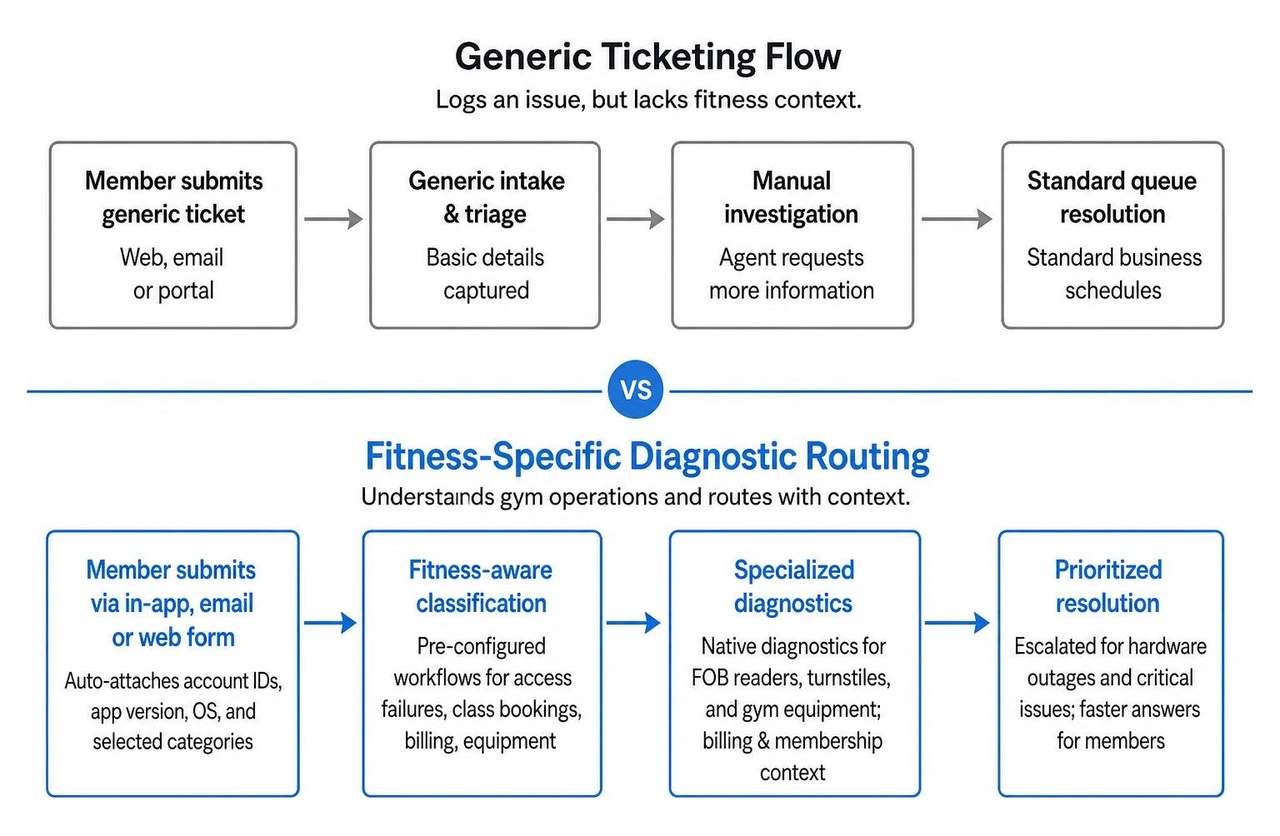
Generic ticketing software can log an issue, but it does not know what a 24/7 access controller or a clip card package is. A dedicated fitness support architecture bridges the gap between digital software commands and physical facility hardware.
| Feature | Generic Help Desk Software | Dedicated Fitness Help Desk |
|---|---|---|
| Hardware Troubleshooting | Requires custom API setups and generic manual tickets | Native diagnostics for FOB readers, turnstiles, and specialized gym equipment |
| Billing & Membership Awareness | Basic invoice ticketing without facility context | Direct integration with clip cards, membership tiers, and dues processing |
| Member Routing Logic | Generic keyword matching | Pre-configured workflows for access failures, class bookings, and workout logging |
| Escalation Speed for Outages | Standard business-queue wait times | Prioritized routing for door access controller and turnstile dropouts |
Understanding how a gym membership system can help streamline your operations begins with recognizing that your operational tools and your customer support channels must speak the exact same language.
Resolving Hardware and Access Control Failures
When automated door strikes or FOB readers malfunction, members are left standing outside in the cold. Hardware diagnostics require specific step-by-step procedures rather than standard software reboots.
A fitness-tailored help desk provides dedicated playbooks for:
- Door and Access Controllers: Step-by-step guides for soft reboots, power cycling access control panels, and verifying network connectivity after local power interruptions.
- FOB Reader Sync: Re-pairing door readers, checking controller communication loops, and auditing physical card assignment logs.
- Specialized Studio Equipment: Handling routine diagnostics and technical calibration for facility-specific machines such as specialized biometric stations.
- Peripheral Hardware: Installing and calibrating electronic signature pads and front-desk barcode scanners.
Managing Product Catalog and Membership Campaign Updates
Help desks do not just handle bugs; they also process operational catalog updates. Front-desk staff frequently need assistance configuring seasonal promotions, adjusting seat capacity caps, or managing multi-tier packages. Reviewing gym management software 101: answering your FAQs provides a solid baseline for how product catalogs interact with member records.
Common administrative help desk requests include:
- Creating customized clip cards (punch passes) with expiration dates.
- Updating retail campaign pricing across POS terminals.
- Adjusting client coaching seat limits when trainers reach capacity.
- Modifying recurring membership tiers and automated renewal conditions.
Troubleshooting Common App, Account, and Wearable Issues
A substantial portion of inbound tickets stem from mobile member apps and connected fitness hardware. Proactive communication and structured troubleshooting keep digital friction from eroding retention. Clear messaging through how gym software can improve your retention through communication plays a major role in keeping members informed whenever widespread updates or bug fixes take place.
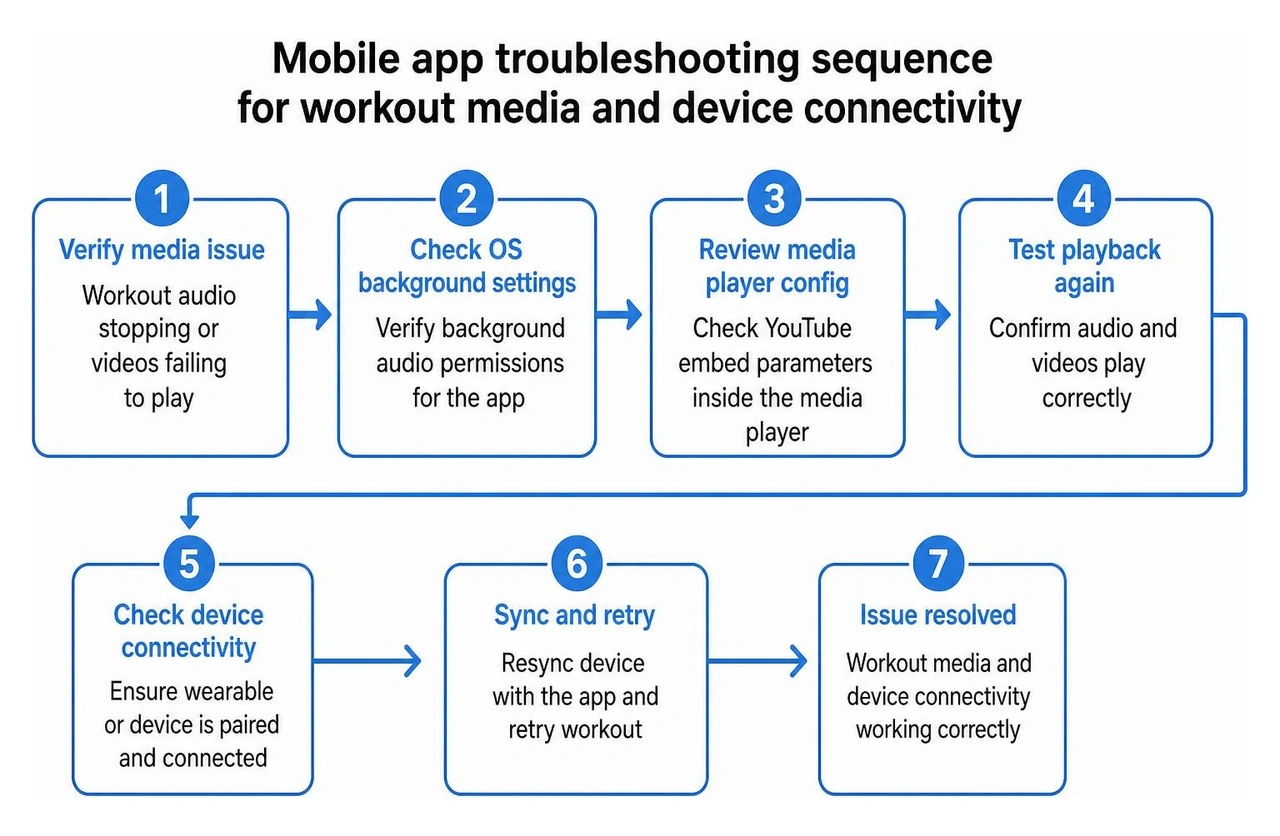
When members report media glitches inside the app—such as workout audio stopping midway through a set or embedded exercise demonstration videos failing to play—the issue is often background operating system conflicts. Verifying that the app has background audio permissions and checking YouTube embed parameters inside the media player resolves the vast majority of these playback errors.
Account Management and Invitation Delivery Workflows
Account setup hurdles represent the first hurdle a new member faces. When an onboarding sequence stumbles, structured troubleshooting clears the path:
- Missing Invitation Emails: When automated welcome emails fail to arrive, have staff check spam filters, confirm the exact spelling in the member profile, and trigger a manual invitation link resend from the administrative console.
- Multi-Account Conflicts: Members who coach at one facility and train at another often experience profile collisions. Standard operating procedures should guide users on how to link multiple profile instances under a single login credential or switch profiles without logging out.
- Password Resets and SSO: Resolving authentication loops caused by third-party authenticators (such as Microsoft Authenticator) by resetting security tokens at the administrative level.
Wearable Sync and Device-Level App Performance
As smartwatches and fitness trackers become standard training gear, help desks must field wearable integration queries. Common wearable conflicts can arise across modern platforms, so structured troubleshooting is essential.
Common device-level hurdles and resolutions include:
- Calendar Sync Failures: If a member's workout schedule fails to populate their native device calendar, prompt them to re-authorize calendar permissions within their mobile operating system settings.
- Smartwatch Performance and Battery Drain: Continuous background heart-rate sync can cause performance lag. Toggling background data refresh settings off and on often restores smooth data flow.
- Missing Visual Badges and Animations: On iOS devices, high-contrast accessibility settings can occasionally block personal-best milestone animations from rendering properly.
- Push Notification Delivery: When class reminders fail, staff should guide members through enabling lock-screen notifications and disabling aggressive battery-saver modes on their smartphones.
- Clean Reinstallation: For persistent crashes, users should verify their current app version number, remove the application, power-cycle the device, and perform a clean reinstallation from their app store.
Standard Operating Procedures for Studio Technical Support in 2026
To keep front-desk staff from getting overwhelmed, studios must implement clear Standard Operating Procedures (SOPs). A structured internal help system empowers every team member to resolve common technical hurdles independently. Studio managers can dive deeper into why software systems are vital for gym owners to understand how standardized tech operations safeguard daily revenue.
Key operational SOPs to maintain at the front desk include:
- QR Code Regeneration: Step-by-step procedures for regenerating dynamic access QR codes for members using non-registered or replacement mobile devices.
- Access Controller Power Cycling: Physical instructions for safely restarting offline door controllers without wiping local access permission caches.
- Peripheral Diagnostics: Checklists for reconnecting Bluetooth barcode scanners, receipt printers, and digital signature pads.
Structuring Knowledge Bases by User Intent
A well-organized self-service portal diverts dozens of routine questions away from your staff each week. Grouping help resources by user intent is a proven approach:
- Workout and Exercise Guidance: Step-by-step exercise tutorials, movement breakdown videos, and routine navigation guides.
- App and Feature Tutorials: Walkthroughs on class booking, spot reserving, personal training scheduling, and tracking workout milestones.
- Technology and Account Administration: Direct answers for payment method updates, membership freezes, wearable pairing, and login recovery.
Frequently Asked Questions About Studio Help Desks
What are the typical support hours and response expectations for fitness software help desks?
Standard technical support desks generally operate Monday through Friday, 9:00 AM to 5:00 PM EST. Tickets submitted after business hours on weekdays are typically reviewed the next business morning. Inquiries submitted over the weekend are usually resolved by the end of the following Tuesday. Critical access outages, however, should always follow emergency escalation workflows.
How should studio staff troubleshoot non-working QR codes or access FOBs?
First, verify that the member's account status is active and that no billing holds exist. If their status is in good standing, check whether their device is registered to their account; if they recently upgraded phones, generate a fresh QR code credential via the administrative console. For physical FOBs, verify the RFID number assigned in their profile, test the key fob on an alternate reader, and perform a quick reboot of the local door controller if all members are experiencing entry delays.
What steps resolve mobile app crashes and wearable sync delays?
Have the user confirm they are running the most recent app version from the App Store or Google Play Store. Next, toggle Bluetooth and background app refresh permissions off and back on. For iOS rendering issues, check whether high-contrast display settings are interfering with animations. If errors persist, clear the app cache, delete the application, restart the smartphone, and perform a clean reinstallation.
Conclusion
Scaling a fitness studio requires operational systems that handle daily disruptions calmly and efficiently. When your administrative workflows, 24/7 access control tools, and membership billing are tightly connected, technical hiccups transform from stressful emergencies into simple, routine tasks.
At Club Systems, we equip health clubs and studios with integrated management software, dependable 24/7 access controls, industry-leading dues collection services, and cash-discount credit card processing—all backed by dedicated, US-based, real-person support. Discover how our seamless member management solutions help you streamline facility operations and scale your community with confidence.
Tired of Struggling with Your Gym's Software?
Simplify your operations, save money, and get the support you need with Club Systems.